True Mirror Online: See How Others Really See You
Switch between your mirror view and true unmirrored view in live video, a 5-second motion clip, or any photo—with zoom, ring light, and an automatic 5-region landmark check.
Free while in beta. Camera video, 5-second clips, and photos are processed locally in your browser.
Worked Example: Why Flipping Changes How You Feel, Not Your Geometry
Notice how a natural off-center hair part makes the flipped portrait look noticeably different at first glance, yet the underlying five-region facial geometry stays identical to the tenth of a percent.

Measured 5-Region Deviation on This Portrait (0.0% Flip Delta)
Average deviation: 0.7%
- Nose wings
- 1.3%
- Mouth corners
- 0.9%
- Eyebrows
- 0.6%
- Jawline
- 0.4%
- Outer eye corners
- 0.1%
Across five paired regions from the 478-point face mesh, this portrait's average mirror deviation stays small and identical in both orientations. When a flipped filter feels jarring, visual familiarity—not sudden asymmetry—is doing most of the work.
How to See Your True Unmirrored Face Without Any Tool
Before relying on an inverted face filter or webcam, three low-tech checks show how other people actually see your face in natural motion and lighting.
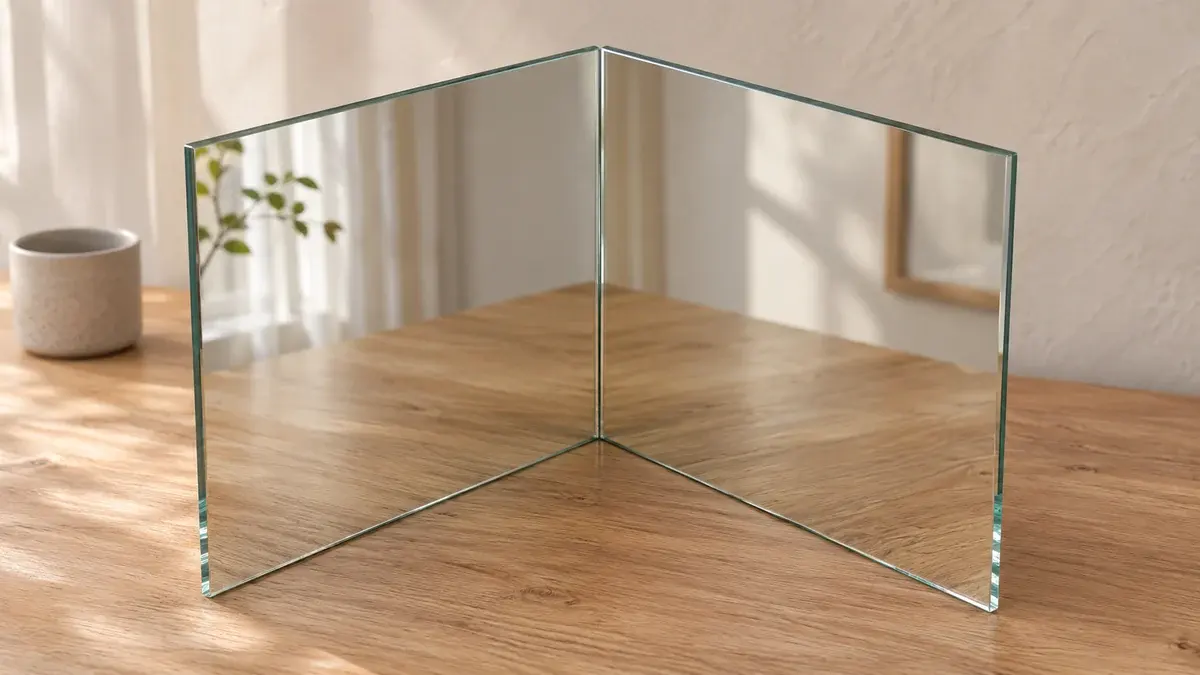
1. The 90-degree two-mirror test
Place two flat mirrors edge to edge at a clean 90-degree corner. Looking into the seam reflects light twice, canceling the left-right reversal so you see a real-time, non-reversed 3D image.
2. Rear camera at 5 to 6 feet
Prop your phone at eye level about 5 to 6 feet (1.5 to 1.8 m) away using the rear camera and a self-timer. Stepping back reduces close-range wide-angle distortion while keeping the unmirrored orientation.
3. A 5-second natural video clip
People never see you frozen mid-blink in a flat still photo. Recording a brief unmirrored clip (or using our 5-second motion clip toggle above) reproduces the expression and movement cues others actually read.
Why the Inverted Face Filter Feels Wrong: The Mere-Exposure Effect
Your brain spends years building a mental template of your face exclusively from bathroom mirrors and mirrored selfie previews. When a true mirror camera or inverted filter flips left and right, every subtle natural offset doubles relative to what you expect.
In a classic experiment by Mita, Dermer, and Knight (1977, Journal of Personality and Social Psychology), participants significantly preferred their own mirrored photograph, while close friends and romantic partners significantly preferred the true unmirrored print. The image did not become less attractive; familiarity drove each viewer's preference.
More recently, Frautschi, Orfahli, and Zins (2021, Aesthetic Surgery Journal) tested 30 adults comparing a standard mirror against a physical non-reversing mirror for 30 seconds each. 83.3% reported seeing a qualitative difference (73% felt less symmetric and 53% less balanced), with statistically significant shifts on FACE-Q Age Appraisal (p = 0.007) and Appearance-Related Psychosocial Distress (p = 0.001).
Think about your friends on a video call or across a dinner table: you have always seen their unmirrored faces, and their natural hair part or slight eyebrow offset never looks jarring to you—yet if you flipped their face in a mirror, it would look strangely off to you too. Others experience your true unmirrored view the exact same way.
Mirror vs. Phone Camera: Why Close Selfies Distort Your Face
An unmirrored phone selfie is rarely identical to how you look in person. Most phone front cameras use a wide-angle lens around 24 to 28 mm equivalent. In a mathematical modeling study published in JAMA Facial Plastic Surgery, Ward, Ward, Fried, and Paskhover (2018) showed that a 12-inch (30 cm) close selfie makes the nasal base appear roughly 30% wider than a standard 5-foot (1.5 m) portrait distance.
A wall mirror doubles the optical path (you to mirror plus mirror back to your eyes) and lets both eyes fuse a 3D stereo view. To make an online true mirror camera match in-person proportions, step back 5 to 6 feet or switch to a 2x lens instead of shooting an arm's-length close-up.
Same Person, Same Light: Close 24mm Selfie vs. 6 ft Portrait Distance


Close Selfie (~24–28 mm wide)
Arm's length (~1 ft / 30 cm)
Nose sits relatively closer; outer jaw narrows.
Natural Viewing / Mirror Path
5–6 ft (1.5–1.8 m) or 2x optical lens
Flatter perspective closer to how others see you.
Controlled On-Device Check: Flipping vs. Lens Distance
Running our browser 478-point landmark detector directly on the reference portraits above shows the two effects side by side: horizontally flipping the same image leaves nose-to-jaw ratio virtually unchanged (0.314 vs. 0.316, within 0.2% neural mesh jitter on average deviation), whereas moving from ~6 feet to ~1 foot jumps the nose-to-jaw width ratio from 0.329 to 0.418 (+27%).
| Test Condition | 5-Region Avg Dev | Nose Wing / Jaw Width | Nose Wing / Outer-Eye Width |
|---|---|---|---|
| Sample portrait 1 — Original orientation | 0.7% | 0.314 | 0.393 |
| Sample portrait 1 — Horizontally flipped | 0.9% | 0.316 | 0.388 |
| Lens pair — ~6 ft / 85mm distance | 0.4% | 0.329 | 0.402 |
| Lens pair — ~1 ft / 24mm close distance | 1.0% | 0.418 | 0.431 |
Measured locally on our production MediaPipe face mesh across these two controlled reference pairs (n = 2 pairs). Mathematical reflection of identical landmark coordinates yields a 0.0% delta; re-running the neural detector on a flipped image can show ~0.2% inference jitter. Individual camera lenses and lighting may vary.
Step back 5 to 6 feet
Keep your laptop webcam or phone well past arm's length (or switch to a 2x lens) so wide-angle foreshortening stops inflating nose width.
Align lens to eye level
Tilting a camera up from your lap or down from above shifts jawline and midface proportions far more than flipping left and right.
Face even front window light
Hard side shadows create fake visual asymmetry on one cheek that disappears as soon as both sides receive balanced front light.
Mirror vs. True View: Which Cameras and Apps Flip Your Face?
One reason people get confused is that preview screens and saved photos often use opposite orientations across devices.
| Device or App | What You See | Key Detail |
|---|---|---|
| Standard wall mirror | Mirrored | Reverses left and right, with full 3D stereo depth and doubled optical distance. |
| iPhone front camera preview | Mirrored | Live viewfinder mirrors like a bathroom mirror so framing feels natural. |
| Saved iPhone selfie | True (unmirrored) by default | Saves unmirrored unless you open Settings → Camera and turn on Mirror Front Camera. |
| Android front camera | Varies by manufacturer | Many phones mirror previews and include a Save Selfies as Previewed toggle in Camera settings. |
| Phone rear camera | True (unmirrored) | Captures the orientation other people see, without mirroring. |
| Zoom & Google Meet | Mirrored for you; True for others | Self-view is mirrored by default for comfort, while other participants see your unmirrored image. |
| Physical 90° True Mirror | True (unmirrored) in 3D | Uses two angled front-surface mirrors to show a non-reversed reflection with natural depth. |
How the Automatic 5-Region Landmark Check Separates Habit From Geometry
Whenever you freeze a camera frame or load a photo, this page runs a 478-point MediaPipe face mesh locally in your browser. Instead of slicing vertically down the center of the image frame—where a tiny head tilt fakes asymmetry—it anchors the midline perpendicular to the line connecting your eye centers and compares five paired regions: eyebrows, outer eye corners, nose wings, mouth corners, and jawline. Toggle Show 5-Region Overlay to inspect those exact points on your photo.
Because horizontal reflection preserves Euclidean distances mathematically, flipping a face changes which side looks familiar without altering objective landmark deviation. For a full three-panel left-mirrored and right-mirrored visual breakdown, open our dedicated face symmetry test.
What an Online True Mirror Can and Cannot Show
A browser true mirror camera removes left-right reversal instantly and adds practical grooming tools like zoom, screen ring light, and 5-second motion replay, but it still passes through a single flat webcam or phone sensor. Unlike a human eye or physical 90-degree mirror, a 2D lens has no stereo depth and remains sensitive to wide-angle focal length, harsh overhead light, and slight head turns.
Use this page to get comfortable with your unmirrored orientation and check your five paired symmetry regions. When you want to evaluate broader front-facing proportions across harmony, eye area, and jawline, try our full attractiveness test.
True Mirror Online FAQ
Compare Your Mirror and True View Now
Open the live unmirrored camera, record a 5-second motion clip, or flip any photo locally in your browser—with automatic 5-region symmetry feedback.
Open True Mirror AboveContinue with related tools
Face Symmetry Test
See your five paired facial regions alongside left-mirrored and right-mirrored composite portraits.
Face Shape Detector
Identify your face shape across seven categories with the five geometric ratios behind the call.
Attractiveness Test
Measure overall facial harmony, symmetry, eye area, and jawline proportions locally in your browser.
PSL Scale Explained
See how 0 to 8 facial proportion tiers work and why different sites return different numbers.